After installing an SSL certificate, you may experience domain conflict issues such as redirects not working properly, mixed content warnings, or your website loading from the wrong domain (e.g., non-www redirecting incorrectly to www or vice versa). These issues usually happen when domain settings, redirects, or SSL configurations are not aligned.
This article explains the causes of domain conflicts after SSL installation and how to fix them quickly.
Common Symptoms of Domain Conflict After SSL
- Your website switches between http and https.
- The domain loads the wrong version (www vs non-www).
- Browsers show certificate mismatch errors.
- Mixed content warnings.
- Pages not loading or redirect loops.
- The domain resolves to a different directory or addon domain.
Causes of Domain Conflicts
Domain conflicts usually occur due to:
- Incorrect redirect rules in .htaccess.
- SSL installed for the wrong domain or subdomain.
- Mixed content (images, CSS, scripts still loading over HTTP).
- CDN or caching still using old domain settings.
- Addon or alias domains pointing to the wrong document root.
- Old certificates still cached by the browser or server.
How to Fix Domain Conflict Issues After Installing SSL
1. Ensure the SSL Certificate Matches the Correct Domain
Check that the SSL certificate was installed on the correct domain:
- Log in to cPanel.
- Locate the Security section, and click on SSL/TLS Status.
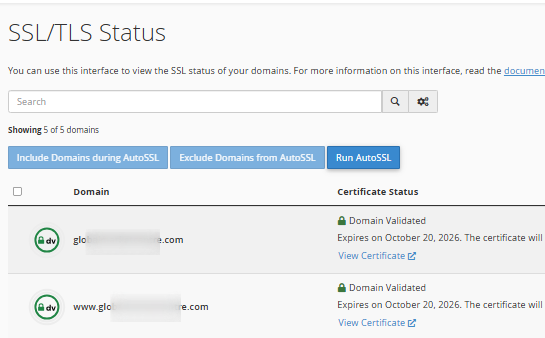
- Ensure the primary domain and subdomains show a valid SSL.
- Re-run AutoSSL if any domains show “Expired” or “Not Covered”.
If the certificate is tied to the wrong domain, reinstall or request a new one.
2. Fix Redirects in Your .htaccess File
Incorrect redirects are the most common cause of conflicts.
Make sure your .htaccess only contains one set of redirects forcing HTTPS and your preferred domain (www or non-www).
Example of a clean HTTPS redirect (you may already know this, but customers need it):
- Force HTTPS (www or non-www, whichever the user prefers).
- Remove duplicate or conflicting redirect lines.
If customers had multiple plugins or old redirects, removing those duplicates usually fixes the conflict.
3. Check the Domain’s Document Root
A domain conflict may occur if the domain points to the wrong folder.
Go to:
cPanel → Domains → Document Root
Ensure each domain (primary, addon, or subdomain) points to the correct directory.
Correct any mismatches that may have happened before SSL activation.
4. Clear Cache and CDN Records
After SSL installation, cached DNS or HTTP data may cause conflicts.
Clear:
- Website cache
- Browser cache
- CDN cache (e.g., Cloudflare)
- Plugin cache (especially on WordPress)
This resolves most post-SSL redirection conflicts.
5. Fix Mixed Content Issues
If some elements still load over HTTP, browsers may block them.
For WordPress sites:
- Use plugins like:
- Really Simple SSL
- Better Search Replace (to update old HTTP URLs)
Make sure all images, CSS, and JS files load from HTTPS.
6. Re-sync DNS Records
If your domain recently moved, DNS might still be propagating.
Verify:
- A records
- CNAME records
- www and non-www entries point to the same server
DNS mismatches can cause the site to load inconsistently after SSL.
Note:
- Always choose one preferred domain (www or non-www).
- Avoid installing multiple redirect plugins.
- Keep DNS records clean and consistent.
- Re-run AutoSSL after adding new domains or subdomains.
- Use a single source of redirects (server or plugin, not both).
Frequently Asked Questions (FAQ)
Q: Why does my site show a certificate mismatch error?
Your SSL is installed on one version of the domain but the site is loading the opposite (e.g., www instead of non-www).
Q: Why does my site keeps redirecting between http and https?
Conflicting rules in .htaccess or mixed domain settings.
Q: Do I need to reinstall SSL to fix the conflict?
Not always. Most issues are caused by redirects, caching, or DNS misconfiguration.
Q4. Why does only the homepage load correctly after SSL?
Other pages likely contain mixed content or outdated links using HTTP.
If you need help fixing domain conflicts after installing SSL, kindly reach out to our support team.