Leech Protection is a powerful cPanel feature that helps prevent users from publicly sharing their website login credentials. When enabled, it limits the number of logins per user within a specific time frame and redirects or suspends accounts if unauthorized access is detected.
This feature is especially useful for membership sites, forums, or password-protected directories where multiple users have access credentials. By enabling Leech Protection, you can maintain control over your site’s security and bandwidth usage.
What is Leech Protection?
Leeching occurs when authorized users share their login credentials with others or post them publicly, allowing multiple people to access restricted areas.
For example, if you run a members-only section on your website, one user might share their username and password on social media, giving hundreds of people access.
Leech Protection detects this abuse and automatically takes action by:
- Blocking the compromised account.
- Redirecting the user to a specific URL.
- Sending admin alerts about the suspicious activity.
When to Use Leech Protection
You should enable Leech Protection if your website:
- Has password-protected directories (e.g., through Directory Privacy).
- Offers member login access or subscription-based content.
- Experiences multiple login attempts from the same user account.
- Needs to restrict excessive or unauthorized logins.
How to Enable Leech Protection in cPanel
Follow these steps to set up Leech Protection for your website directories:
STEP 1: Log in to cPanel.
There are three methods to log into your cPanel.
- Method 1: Log in to your cPanel directly.
- Method 2: Log in to your cPanel through your Customer Portal.
Through your Customer Portal;
- Log in to your Customer Portal.
- Click on "Log in to cPanel".
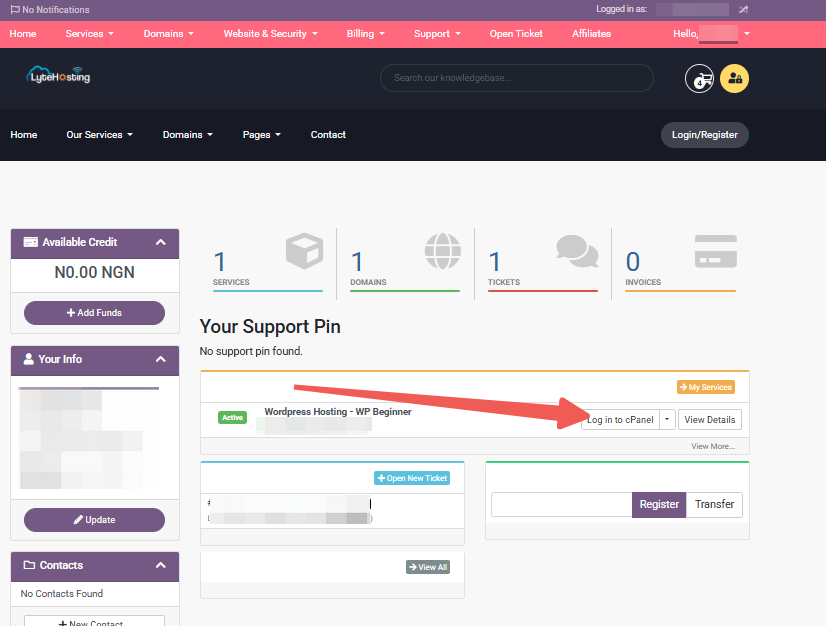
- Method 3: Log in using the details sent to your Email.
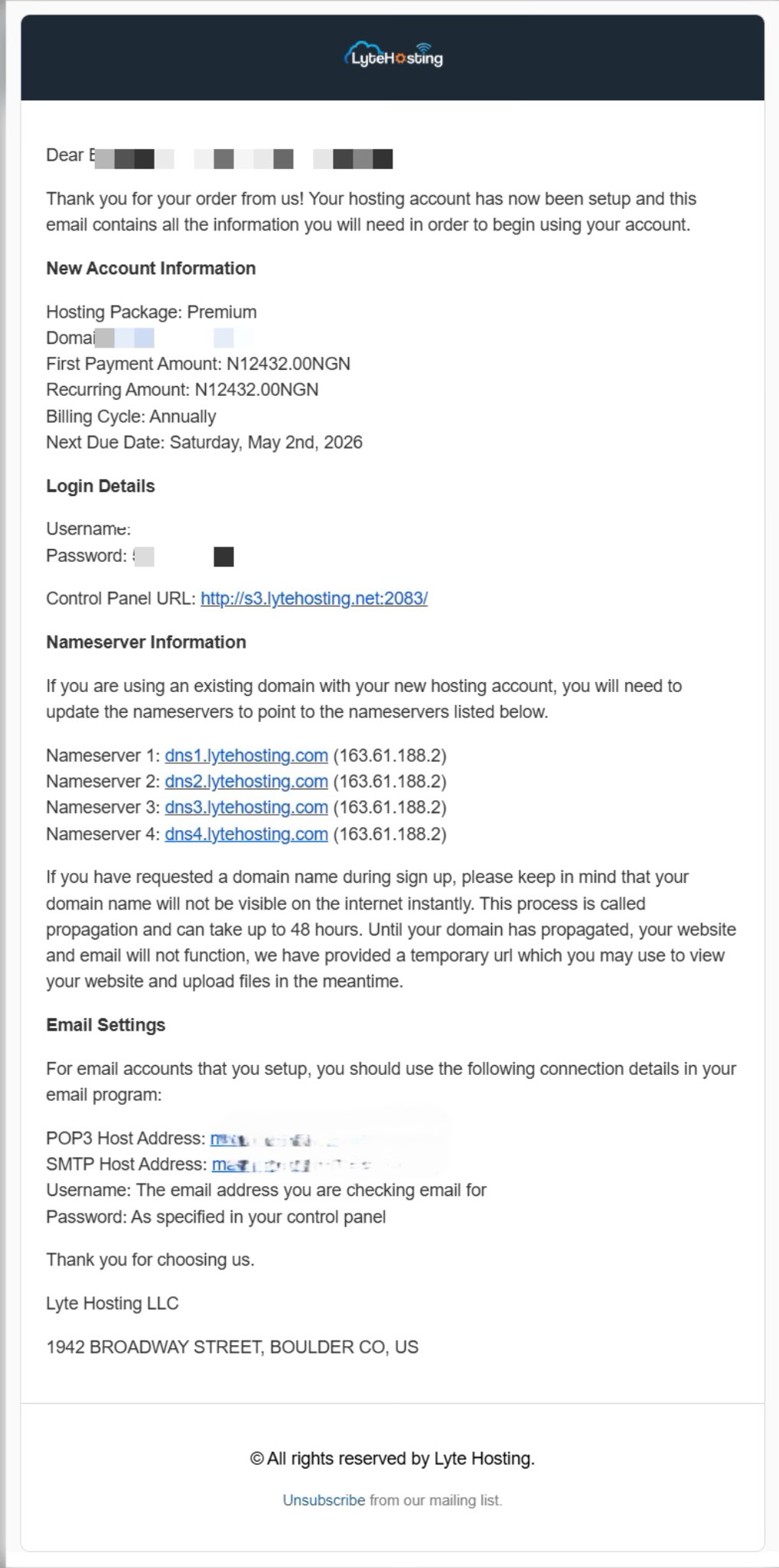
Through your Email;
- When you purchase a hosting plan, your cPanel login details (including username, password, and cPanel URL) are automatically sent to your registered email address. Simply check your inbox (or spam folder), locate the email, and use the provided credentials to access your cPanel.
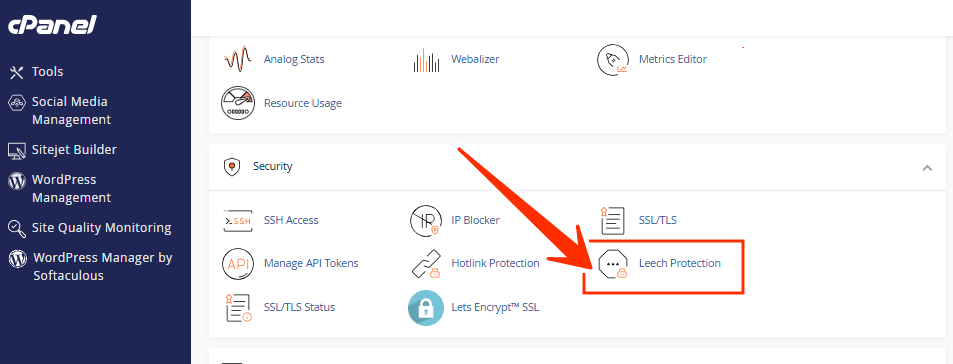
STEP 2: In the Security section, click on Leech Protection.
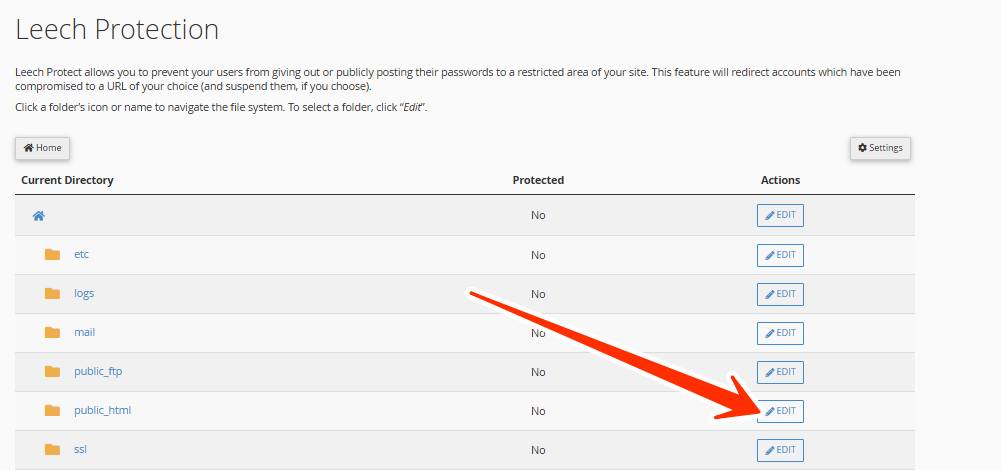
STEP 3: A list of your website’s directories will appear. Browse through your directories and Edit beside the folder where you want to enable protection.
- You can only apply Leech Protection to folders that are password-protected using the Directory Privacy
STEP 4: Once selected, you’ll be taken to the configuration page.
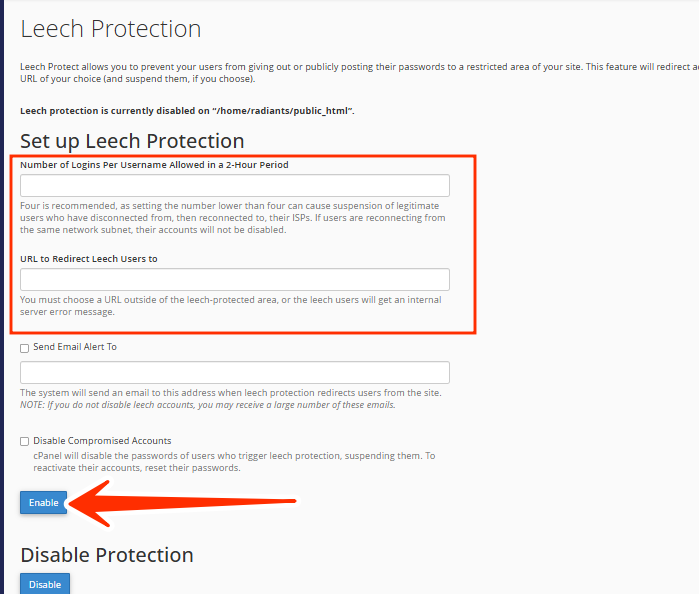
STEP 5: On the configuration page, you’ll find several options to customize your protection:
- Set Login Limits: Enter the number of allowed logins per username within a 2-hour period (for example, 5 logins). If the number of logins exceeds this limit, the system will treat it as a possible leech attempt.
- Redirect URL: Enter the URL where you want users to be redirected if they trigger Leech Protection (for instance, a warning or error page).
- Send Email Alerts: Enable this option to receive an email notification whenever Leech Protection is triggered. Add your email address in the provided field.
- Disable Compromised Accounts: Check this box to automatically suspend any user account that exceeds the login limit.
Once you’ve configured these settings, click Enable to activate Leech Protection for that directory.
STEP 6: After enabling it:
- Attempt multiple logins using the same credentials within a short time frame.
- Confirm that the system enforces your defined limits.
- Check your email for any alerts or activity notifications.
If the protection doesn’t trigger, review your login limit and ensure the directory is password-protected.
How to Disable Leech Protection (Optional)
If you need to turn off Leech Protection:
STEP 1: Return to the Leech Protection section in cPanel.
STEP 2: Locate the protected directory.
STEP 3: Click Disable or uncheck the protection settings.
Tips for Stronger Website Security
- Use unique usernames and passwords for each member.
- Combine Leech Protection with Directory Privacy for better access control.
- Review login activity and logs regularly.
- Set a reasonable login limit (e.g., 5–10 logins every 2 hours).
- Update your cPanel and website software regularly to close potential vulnerabilities.
Frequently Asked Questions (FAQs)
Q: What happens when Leech Protection is triggered?
When triggered, cPanel can automatically suspend the compromised account, redirect the user, and send an email alert to the admin.
Q: Can I use Leech Protection without Directory Privacy?
No. Leech Protection only works for directories that are already password-protected through the Directory Privacy tool.
Q: How do I choose a good login limit?
It depends on your website activity. For most websites, 5–10 logins within 2 hours is a safe range.
Q: Will Leech Protection block legitimate users?
If configured too strictly, it might temporarily restrict legitimate users who log in frequently. Adjust limits based on your traffic pattern.
Q: Does Leech Protection apply to CMS logins (like WordPress)?
No. It applies only to password-protected directories in your hosting account, not to web application logins.
If you need help configuring or testing Leech Protection, kindly reach out to our support team for assistance.